Fresh install of Ubuntu 22.04 x64

paste
sudo apt update && sudo apt upgrade -y
paste
sudo apt install -y apt-transport-https ca-certificates curl software-properties-common
curl -fsSL https://download.docker.com/linux/ubuntu/gpg | sudo gpg --dearmor -o /usr/share/keyrings/docker-archive-keyring.gpg
echo "deb [arch=amd64 signed-by=/usr/share/keyrings/docker-archive-keyring.gpg] https://download.docker.com/linux/ubuntu $(lsb_release -cs) stable" | sudo tee /etc/apt/sources.list.d/docker.list > /dev/null
sudo apt update
sudo apt install -y docker-ce
paste:
sudo systemctl start docker
sudo systemctl enable docker
check docker:
sudo docker --version
paste:
sudo curl -L "https://github.com/docker/compose/releases/download/$(curl -s https://api.github.com/repos/docker/compose/releases/latest | grep -Po '"tag_name": "\K.*?(?=")')/docker-compose-$(uname -s)-$(uname -m)" -o /usr/local/bin/docker-compose
give permission:
sudo chmod +x /usr/local/bin/docker-compose
check docker-compose:
docker-compose --version
generate livekit config:
docker pull livekit/generate
docker run --rm -it -v$PWD:/output livekit/generate
select: both egress and ingress
enter your chosen hostname from picture one example: Livekit.esunus.com
Don't need turn domain, just put turn.cloudflare.com
for rest of options just select default by pressing enter button
select:
startup shell script
save your information:
example of information:
Server URL: wss://livekit.esunus.com
RTMP Ingress URL: rtmp://livekit.esunus.com/x
API Key: APIMdssdfdsfsdeEr
API Secret: RRR5EcXV1JKFV5kfEvEQgisvzFM7XpelVvzkwIohpULsA
Here's a test token generated with your keys: eyJhbGciOiJIUzI1NiIsInR5cCI6IkpXVC J9.eyJleHAiOjE3NzM3NDU5NjUsImlzcyI6IkFQSU1kUGZNREFFbXo4ZCIsIm5hbWUiOiJUZXN0IFVzZ XIiLCJuYmYiOjE3Mzc3NDU5NjUsInN1YiI6InRlc3QtdXNlciIsInZpZGVvIjp7InJvb20iOiJteS1ma XJzdC1yb29tIiwicm9vbUpvaW4iOnRydWV9fQ.YmgdX00dJLmVh1UiA5TBHQSMQjuN0ABJPy8PK0C-uR 0
An access token identifies the participant as well as the room it's connecting t
check directory using ls
you will see your chosen name "Livekit.esunus.com"
enter this cd
Livekit.esunus.com

edit file init_script.sh
nano init_script.sh
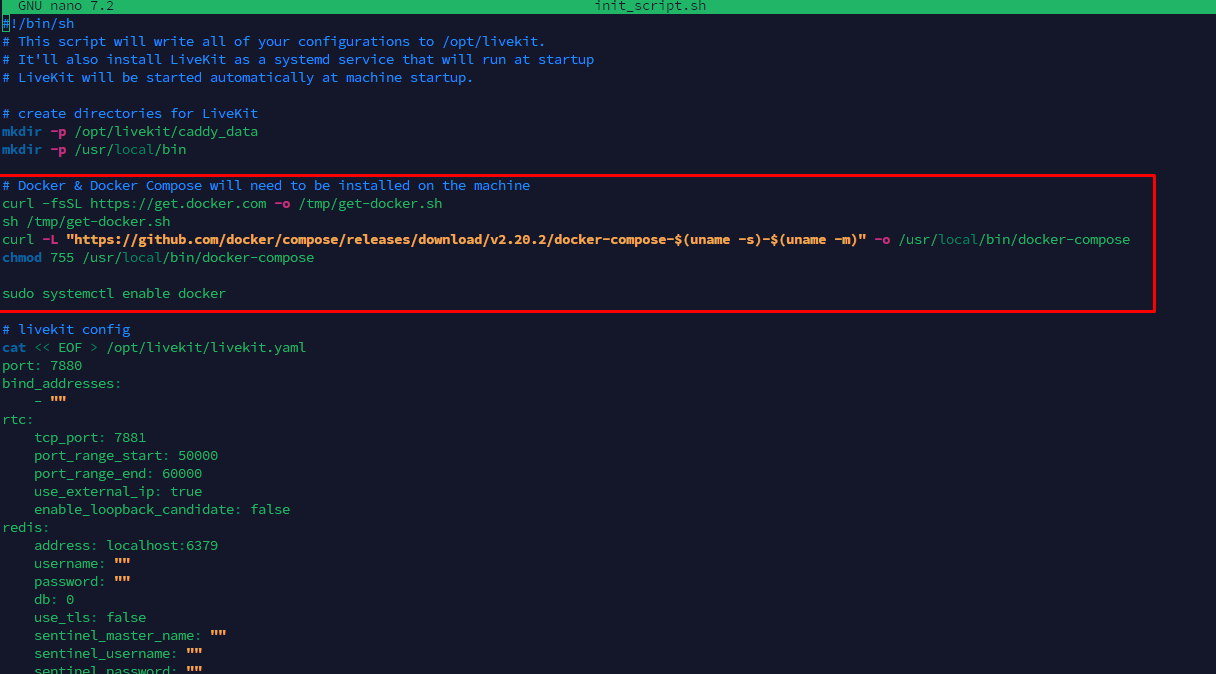
(check image above)
delete the lines that are in the box in picture 3
the following lines need to be deleted:
# Docker & Docker Compose will need to be installed on the machine
curl -fsSL https://get.docker.com -o /tmp/get-docker.sh
sh /tmp/get-docker.sh
curl -L "https://github.com/docker/compose/releases/download/v2.20.2/docker-compose-$(uname -s)-$(uname -m)" -o /usr/local/bin/docker-compose
chmod 755 /usr/local/bin/docker-compose
sudo systemctl enable docker
you can go to the top line # Docker & Docker Compose will need to be installed on the machine
and do ctrl k
after you delete those lines save the file
ctrl o , enter then ctrl x to close
paste :
chmod +x init_script.sh
run the file
sudo bash init_script.sh
allow ports:
sudo ufw allow 50000:60000/udp
sudo ufw allow 1935/tcp
sudo ufw allow 7885/udp
sudo ufw allow 3478/udp
sudo ufw allow 7881/tcp
sudo ufw allow 443/tcp
sudo ufw allow 80/tcp
sudo ufw allow 22/tcp
sudo ufw reload
enable ufw
sudo ufw enable
check status of ufw
sudo ufw status
check that it says status: active
check the status of livekit-docker
systemctl status livekit-docker
check paste:
cd /opt/livekit
sudo docker-compose logs
paste:
cd /opt/livekit
sudo docker-compose down
sudo docker-compose pull
sudo docker-compose up -d
paste:
systemctl start livekit-docker
check status:
sudo systemctl status livekit-docker
ctrl c to exit status check
close ssh session
check picture below
open your chosen hostname in browser https://livekit.esunus.com
and it will return "ok" as you see in the picture

see picture below for how to put inside admin panel
 Copyright © 2026 Tüm Hakları Saklıdır.

 Türkiye (Türkçe)
 Almanya (German)